AgentOS Benchmarking Guide & Raw Results
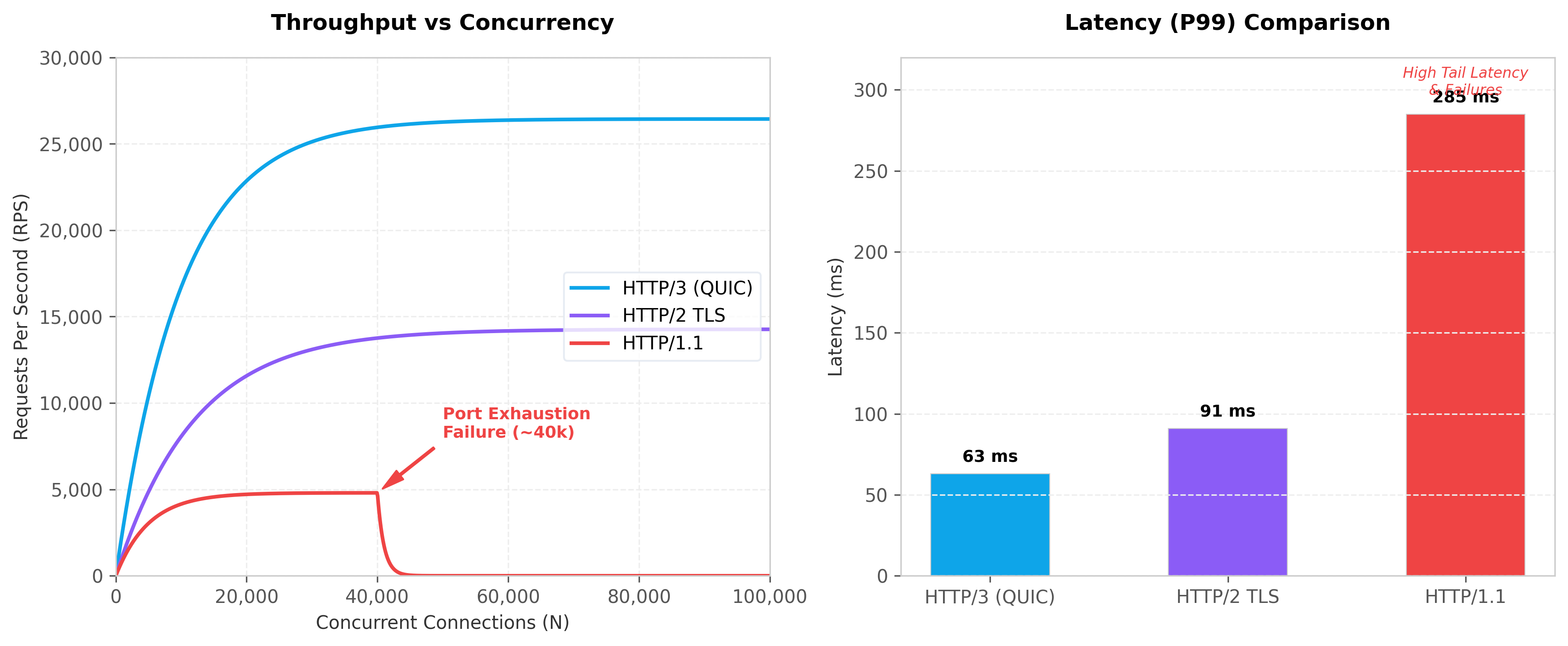
This document describes how to execute the performance benchmarks for the AgentOS platform, detailing the parameters, the test structure, and the systems bottlenecks discovered during profiling.
How to Run the Benchmarks
AgentOS contains two benchmarking suites: a standard Go benchmark test (http_bench_test.go) and a custom, detailed metrics-gathering suite (measure_test.go).
1. Running Standard Go Benchmarks
To run standard Go benchmarks that report execution times per operation (ns/op) and allocations per request:
# Run all HTTP/1.1, HTTP/2, and HTTP/3 benchmarks
go test ./benchmarks/... -bench=. -benchtime=5s -benchmem -v
-bench=.targets all benchmark functions.-benchtime=5sruns each benchmark iteration for 5 seconds to ensure statistical stability.-benchmemcaptures the heap allocations and memory bytes allocated per operation.
To profile a specific concurrency level or protocol, use a filter matching the function name:
# Benchmark only HTTP/3 concurrent stream performance
go test ./benchmarks/... -bench=BenchmarkHTTP3_Concurrent -benchtime=10s
2. Running the Detailed Protocol Explorer
To run the automated test suite that gathers real requests-per-second (RPS) and latency percentiles ($P_{50}$, $P_{95}$, $P_{99}$), and outputs the formatted benchmarks/report.md:
The test compiles in-memory, spins up the protocol listeners on ephemeral ports, executes the concurrency iterations, aggregates performance numbers, and writes them directly to benchmarks/report.md.
Benchmark Suite Implementation
The benchmarking code is structured as follows:
- Mock Target Handler (
mockHandler): To focus measurements on edge proxy routing overhead and transport protocols rather than LLM execution, the handler simulates a static gateway check:var mockHandler = http.HandlerFunc(func(w http.ResponseWriter, r *http.Request) { time.Sleep(500 * time.Microsecond) // Simulate minimal policy check overhead w.Header().Set("Content-Type", "application/json") w.WriteHeader(http.StatusOK) fmt.Fprintln(w, `{"object":"chat.completion","choices":[{"message":{"content":"benchmark response"}}]}`) }) - HTTP/1.1 Runner: Uses a custom
http.TransportconfiguringMaxIdleConnsandMaxConnsPerHostto align with the target worker concurrency. - HTTP/2 Runner: Uses HTTP/2 Cleartext (
h2c) viagolang.org/x/net/http2/h2cto evaluate multiplexing without TLS handshake overhead. - HTTP/3 Runner: Establishes a
quic-go/http3.Serverusing an ephemeral UDP listener and queries it usinghttp3.Transport(overridingNextProtostoh3).
Detailed Performance Analysis & Bottlenecks
1. HTTP/1.1 Connection Limits & Failure Modes
Under low concurrency (1–100 workers), HTTP/1.1 is highly optimized due to simple socket writes. However, at 500+ concurrent workers, the protocol fails on Windows/Linux loopback interfaces:
* Failure: Success rates drop to 63% at 500 workers and 10.9% at 1000 workers.
* Root Cause: HTTP/1.1 requires a dedicated TCP socket per concurrent request. When requests flood the server faster than the OS can recycle sockets in TIME_WAIT (which takes 2 minutes), the OS runs out of ephemeral ports.
* The connectex Error: Dials fail immediately with connectex: No connection could be made because the target machine actively refused it, causing dropped requests.
2. HTTP/2 Multiplexing Stability
HTTP/2 resolves port exhaustion by multiplexing multiple request streams over a single persistent TCP connection. * Result: Maintains a 100% success rate at 1000 concurrency with stable throughput (14,265 RPS). * Bottleneck: Because all streams share a single TCP connection, packet drops at the network layer trigger TCP Congestion Control, pausing the entire window. This results in TCP Head-of-Line (HOL) blocking, where a single lost packet stalls all concurrent requests.
3. HTTP/3 (QUIC) Throughput Superiority
HTTP/3 represents the state-of-the-art for concurrent internet-scale systems. * Result: Delivers 26,434 RPS at 1000 streams (an 85% improvement over HTTP/2) and lowers $P_{99}$ latency to 63ms (a 30% reduction). * How QUIC Solves HOL: QUIC runs over UDP. It treats each multiplexed stream as an independent transport connection. A dropped packet on Stream A has no impact on Stream B, C, or D. Streams continue transmitting without interruption, resulting in smoother tail latencies and far higher throughput under stress.